
前回の投稿では、タイムレコーダー画面と打刻 API、手動座標での半径判定までを確認しました。
手動座標はデモや失敗パターンの再現には便利ですが、せっかくモバイルアプリを作っているので、スマホならではの GPS で位置を取りたい気持ちがあります。SuperNative の価値を示すうえでも、ネイティブ側から位置を取るところまで行きたいところです。
Marketplace に nativephp/mobile-geolocation はありますが、有料ですので、今回は、打刻に必要な「いまの位置を 1 回取る」だけに絞って、自作のワンショット GPS プラグイン local/simple-geolocation を実装し、手動座標を OFF にしたまま出勤できるところまで進めます。
ただ、自作プラグインになると Android 側は Kotlin にも触れることになります。普段の PHP からは少し離れる内容なので、本編とは切り分けて 特別編 としてまとめます。
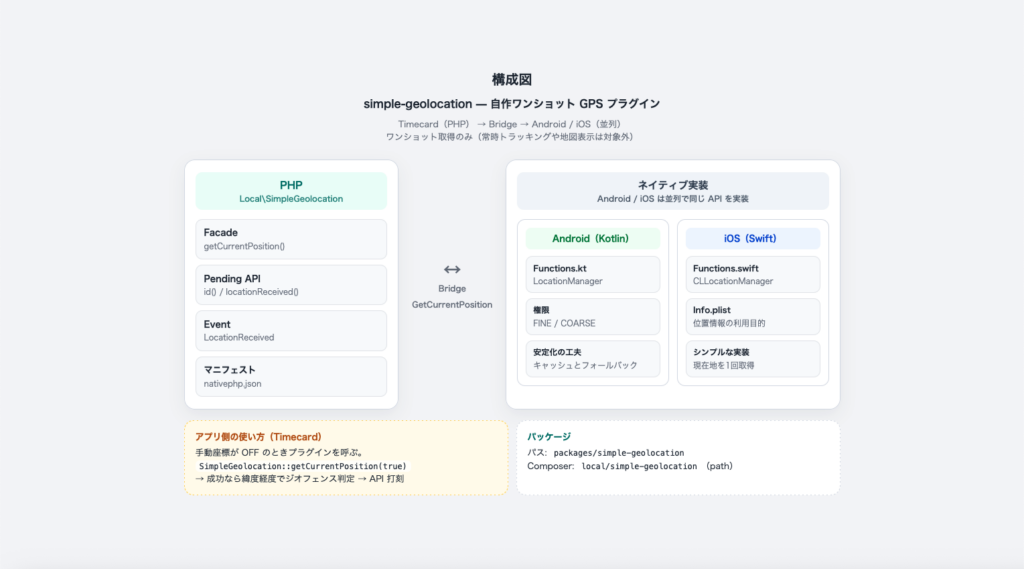
1)今回の範囲と制限事項
自前プラグインでの動作範囲と制限事項を以下に記載します。
| 動作範囲(できること) | 制限事項(やらないこと) |
| 現在地を 1 回取得し、Event で PHP に返す | 常時トラッキング・バックグラウンド追従 |
| Android / iOS で同じ Bridge API | 地図表示 |
| 権限ダイアログの表示 | 有料プラグイン相当の機能実装 |
打刻する際に必要な「現在の位置を取得」だけに絞っています。
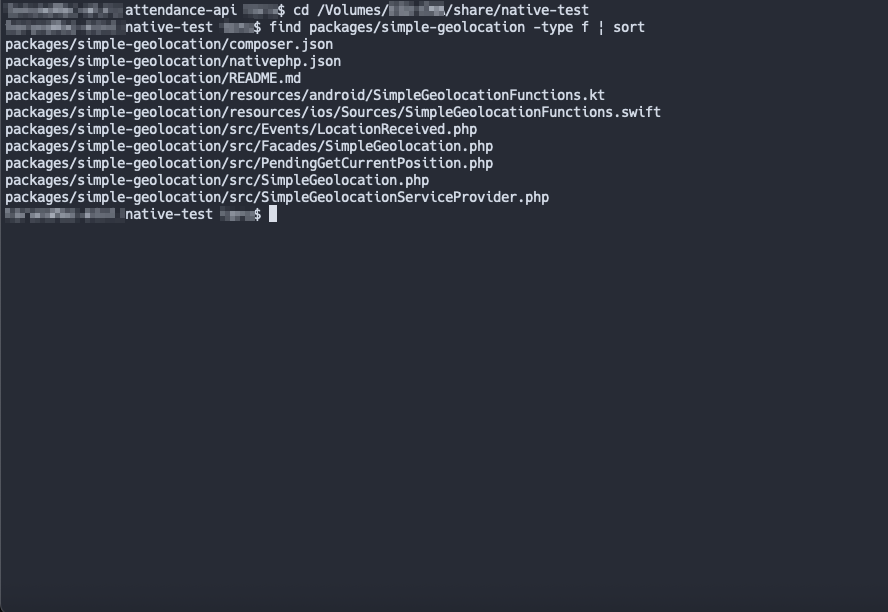
2)プラグインのパッケージ構成
配置は packages/simple-geolocation で、Composer の path リポジトリとして読み込みます。
Composer のパッケージ名は、通常 ベンダー名/パッケージ名 の形になります。社内向けなら 会社名/… のように社名をベンダーにすることが多いですが、今回は検証ですので、社名には依存しない local/simple-geolocation にしました。PHP の名前空間もあわせて Local\SimpleGeolocation です。
- PHP : Facade / Pending / LocationReceived Event
- Android : SimpleGeolocationFunctions.kt(LocationManager)
- iOS : SimpleGeolocationFunctions.swift(CLLocationManager)
- マニフェスト : nativephp.json(権限・Bridge・Event の定義)
以下はパッケージツリーとなります。
プラグインの処理の流れはシンプルです。打刻ボタンを押すと、PHP からネイティブへ「現在の位置を取って」と頼み、結果が戻ってきてから、前回と同じ半径判定と API 送信に入ります。
- Timecard(PHP)が位置取得を要求する
- Bridge(SimpleGeolocation.GetCurrentPosition)経由でネイティブへ渡す
- Android は Kotlin、iOS は Swift が GPS を取る
- 結果を LocationReceived Event として PHP に返す
- 半径判定のあと、問題なければ打刻 API へ送る
プラグイン構成図の記述で示すとすると、次のとおりです。
Timecard(PHP)→ Bridge(SimpleGeolocation.GetCurrentPosition)→ Kotlin / Swift → LocationReceived Event → 半径判定 → 打刻 API
前回と違うのは、位置の取り方だけです。判定や API 連携はそのまま使えます。
3)プラグインソースの説明
composer.json は Composer 用のパッケージ定義です。パッケージ名、PHP / NativePHP への依存、オートロード、ServiceProvider と nativephp.json の場所をここで指定します。
packages/simple-geolocation/composer.json

{
    "name": "local/simple-geolocation",
    "description": "Minimal one-shot GPS plugin for NativePHP Mobile SuperNative (blog Part3)",
    "type": "nativephp-plugin",
    "version": "1.0.0",
    "license": "MIT",
    "authors": [
        {
            "name": "Local",
            "email": "dev@example.com"
        }
    ],
    "require": {
        "php": "^8.2",
        "nativephp/mobile": "^4.0"
    },
    "autoload": {
        "psr-4": {
            "Local\\SimpleGeolocation\\": "src/"
        }
    },
    "extra": {
        "laravel": {
            "providers": [
                "Local\\SimpleGeolocation\\SimpleGeolocationServiceProvider"
            ]
        },
        "nativephp": {
            "manifest": "nativephp.json"
        }
    },
    "minimum-stability": "stable"
}
nativephp.json は NativePHP プラグインのマニフェストです。Bridge 名( SimpleGeolocation.GetCurrentPosition )、Android / iOS の実装クラス、位置情報の権限、返す Event、ServiceProvider を宣言します。ここがプラグインの入口です。
packages/simple-geolocation/nativephp.json

{
    "name": "local/simple-geolocation",
    "version": "1.0.0",
    "description": "Minimal one-shot GPS for NativePHP Mobile SuperNative screens",
    "namespace": "SimpleGeolocation",
    "keywords": ["geolocation", "gps", "location"],
    "category": "utilities",
    "license": "MIT",
    "pricing": {
        "type": "free"
    },
    "platforms": ["android", "ios"],
    "bridge_functions": [
        {
            "name": "SimpleGeolocation.GetCurrentPosition",
            "android": "com.local.plugins.simplegeolocation.SimpleGeolocationFunctions.GetCurrentPosition",
            "ios": "SimpleGeolocationFunctions.GetCurrentPosition",
            "android_params": ["activity"],
            "description": "Request a one-shot GPS fix and dispatch LocationReceived"
        }
    ],
    "android": {
        "min_version": 26,
        "permissions": [
            "android.permission.ACCESS_COARSE_LOCATION",
            "android.permission.ACCESS_FINE_LOCATION"
        ],
        "repositories": [],
        "dependencies": {
            "implementation": []
        }
    },
    "ios": {
        "min_version": "15.0",
        "info_plist": {
            "NSLocationWhenInUseUsageDescription": "出退勤の打刻時に、会社所在地との距離を確認するために位置情報を使用します。"
        },
        "dependencies": {
            "swift_packages": [],
            "pods": []
        }
    },
    "events": [
        "Local\\SimpleGeolocation\\Events\\LocationReceived"
    ],
    "service_provider": "Local\\SimpleGeolocation\\SimpleGeolocationServiceProvider"
}
SimpleGeolocation.php はモバイルアプリ側から SimpleGeolocation:: 〜 と書くための Facade です。Timecard はこのクラス経由で位置取得を呼び出します。
packages/simple-geolocation/src/Facades/SimpleGeolocation.php

<?php

namespace Local\SimpleGeolocation\Facades;

use Illuminate\Support\Facades\Facade;
use Local\SimpleGeolocation\PendingGetCurrentPosition;

/**
 * @method static PendingGetCurrentPosition getCurrentPosition(bool $fineAccuracy = true)
 *
 * @see \Local\SimpleGeolocation\SimpleGeolocation
 */
class SimpleGeolocation extends Facade
{
    protected static function getFacadeAccessor(): string
    {
        return \Local\SimpleGeolocation\SimpleGeolocation::class;
    }
}
SimpleGeolocation.php は Facade の実体です。getCurrentPosition() はすぐ座標を返さず、依頼用の PendingGetCurrentPosition を返します。
さきほどの Facades 配下とファイル名が同じで、どちらも SimpleGeolocation.php ですが、Facades 配下は呼び出し用、こちらは実体です。名前空間が違うので別クラスです。
packages/simple-geolocation/src/SimpleGeolocation.php

<?php

namespace Local\SimpleGeolocation;

class SimpleGeolocation
{
    /**
     * Request a one-shot GPS fix.
     * Listen with ->locationReceived() or #[On(LocationReceived::class)].
     */
    public function getCurrentPosition(bool $fineAccuracy = true): PendingGetCurrentPosition
    {
        return (new PendingGetCurrentPosition)->fineAccuracy($fineAccuracy);
    }
}
PendingGetCurrentPosition.php は位置取得の依頼オブジェクトです。 locationReceived(…) でコールバックを登録し、デストラクタ(または get() )で NativePHP 本体の nativephp_call を呼び出して Bridge に渡します。結果の受け取り口は LocationReceived です。
packages/simple-geolocation/src/PendingGetCurrentPosition.php

<?php

namespace Local\SimpleGeolocation;

use Illuminate\Support\Str;
use Native\Mobile\Concerns\HandlesNativeCallbacks;
use Local\SimpleGeolocation\Events\LocationReceived;

/**
 * @method $this locationReceived(\Closure|array|string $callback)
 */
class PendingGetCurrentPosition
{
    use HandlesNativeCallbacks;

    protected ?string $id = null;

    protected string $eventClass = LocationReceived::class;

    protected bool $fineAccuracy = true;

    protected bool $started = false;

    public function id(string $id): self
    {
        $this->id = $id;

        return $this;
    }

    public function getId(): string
    {
        if ($this->id === null) {
            $this->id = (string) Str::uuid();
        }

        return $this->id;
    }

    public function fineAccuracy(bool $fine = true): self
    {
        $this->fineAccuracy = $fine;

        return $this;
    }

    public function get(): bool
    {
        if ($this->started) {
            return false;
        }

        $this->started = true;

        if (! function_exists('nativephp_call')) {
            return false;
        }

        nativephp_call('SimpleGeolocation.GetCurrentPosition', json_encode([
            'id' => $this->getId(),
            'event' => $this->eventClass,
            'fineAccuracy' => $this->fineAccuracy,
        ]));

        return true;
    }

    public function __destruct()
    {
        if (! $this->started) {
            $this->get();
        }
    }
}
LocationReceived.php はネイティブから戻ってきた結果を表す Event です。成功可否、緯度・経度、精度、エラーメッセージ、リクエスト ID を持ちます。Timecard の locationReceived コールバックに渡る $event がこれです。
packages/simple-geolocation/src/Events/LocationReceived.php

<?php

namespace Local\SimpleGeolocation\Events;

use Illuminate\Foundation\Events\Dispatchable;

class LocationReceived
{
    use Dispatchable;

    public function __construct(
        public bool $success,
        public ?float $latitude = null,
        public ?float $longitude = null,
        public ?float $accuracy = null,
        public ?string $error = null,
        public ?string $id = null,
    ) {}
}
SimpleGeolocationServiceProvider.php は Laravel の ServiceProvider です。SimpleGeolocation をコンテナに singleton 登録します。composer.json / nativephp.json の両方から参照されます。
packages/simple-geolocation/src/SimpleGeolocationServiceProvider.php

<?php

namespace Local\SimpleGeolocation;

use Illuminate\Support\ServiceProvider;

class SimpleGeolocationServiceProvider extends ServiceProvider
{
    public function register(): void
    {
        $this->app->singleton(SimpleGeolocation::class);
    }

    public function boot(): void
    {
        //
    }
}
SimpleGeolocationFunctions.kt は Android 側の Bridge 実装です。GetCurrentPosition が PHP からの呼び出しを受け、権限確認のあと LocationManager で位置を取得します。成功/失敗は LocationReceived 相当の Event として PHP に返します。
主にエミュレータで位置の更新が来にくいことへの対策として、次の工夫を入れています。実機でも屋内や起動直後などでは役立ちますが、打刻のように半径の狭い用途では、キャッシュの新しさにも注意が必要です。
- 数分以内の最終位置キャッシュがあればすぐ返す(geo fix 直後に効く)
- 複数プロバイダで購読する(GPS / NETWORK / PASSIVE など)
- タイムアウト時も last-known があればフォールバックする
packages/simple-geolocation/resources/android/SimpleGeolocationFunctions.kt

package com.local.plugins.simplegeolocation

import android.Manifest
import android.annotation.SuppressLint
import android.content.Context
import android.content.pm.PackageManager
import android.location.Criteria
import android.location.Location
import android.location.LocationListener
import android.location.LocationManager
import android.os.Build
import android.os.Bundle
import android.os.Handler
import android.os.Looper
import androidx.activity.result.contract.ActivityResultContracts
import androidx.core.content.ContextCompat
import androidx.fragment.app.Fragment
import androidx.fragment.app.FragmentActivity
import com.nativephp.mobile.bridge.BridgeFunction
import com.nativephp.mobile.utils.NativeActionCoordinator
import org.json.JSONObject

/**
 * Minimal one-shot GPS bridge for SuperNative screens.
 *
 * Emulators often keep a last-known fix but never deliver a fresh GPS
 * update. Prefer a recent cache, listen on multiple providers, and fall
 * back to any last-known location on timeout.
 */
object SimpleGeolocationFunctions {

    class GetCurrentPosition(private val activity: FragmentActivity) : BridgeFunction {
        override fun execute(parameters: Map<String, Any>): Map<String, Any> {
            val id = parameters["id"] as? String
            val event = parameters["event"] as? String
                ?: "Local\\SimpleGeolocation\\Events\\LocationReceived"
            val fineAccuracy = when (val value = parameters["fineAccuracy"]) {
                is Boolean -> value
                is Number -> value.toInt() != 0
                else -> true
            }

            Handler(Looper.getMainLooper()).post {
                ensureHelper(activity).requestLocation(
                    id = id,
                    event = event,
                    fineAccuracy = fineAccuracy,
                )
            }

            return emptyMap()
        }
    }

    private fun ensureHelper(activity: FragmentActivity): LocationHelperFragment {
        val tag = "SimpleGeolocationHelper"
        val existing = activity.supportFragmentManager.findFragmentByTag(tag) as? LocationHelperFragment
        if (existing != null) {
            return existing
        }

        val helper = LocationHelperFragment()
        activity.supportFragmentManager.beginTransaction()
            .add(helper, tag)
            .commitNowAllowingStateLoss()

        return helper
    }
}

class LocationHelperFragment : Fragment() {
    private var pendingId: String? = null
    private var pendingEvent: String = "Local\\SimpleGeolocation\\Events\\LocationReceived"
    private var pendingFine: Boolean = true
    private var locationListener: LocationListener? = null
    private var settled = false
    private val timeoutHandler = Handler(Looper.getMainLooper())

    private val permissionLauncher = registerForActivityResult(
        ActivityResultContracts.RequestMultiplePermissions()
    ) { result ->
        val granted = result[Manifest.permission.ACCESS_FINE_LOCATION] == true ||
            result[Manifest.permission.ACCESS_COARSE_LOCATION] == true

        if (granted) {
            fetchLocation()
        } else {
            dispatchError("位置情報の利用が許可されていません。端末の設定から位置情報を許可してください。")
        }
    }

    fun requestLocation(id: String?, event: String, fineAccuracy: Boolean) {
        pendingId = id
        pendingEvent = event
        pendingFine = fineAccuracy
        settled = false

        val fine = ContextCompat.checkSelfPermission(requireContext(), Manifest.permission.ACCESS_FINE_LOCATION)
        val coarse = ContextCompat.checkSelfPermission(requireContext(), Manifest.permission.ACCESS_COARSE_LOCATION)

        if (fine == PackageManager.PERMISSION_GRANTED || coarse == PackageManager.PERMISSION_GRANTED) {
            fetchLocation()
            return
        }

        permissionLauncher.launch(
            arrayOf(
                Manifest.permission.ACCESS_FINE_LOCATION,
                Manifest.permission.ACCESS_COARSE_LOCATION,
            )
        )
    }

    @SuppressLint("MissingPermission")
    private fun fetchLocation() {
        val context = context ?: run {
            dispatchError("位置情報を取得する準備ができていません。")
            return
        }

        val manager = context.getSystemService(Context.LOCATION_SERVICE) as? LocationManager
        if (manager == null) {
            dispatchError("この端末では位置情報を取得できません。")
            return
        }

        // Fresh enough cache → return immediately (common on emulators after geo fix).
        bestLastKnownLocation(manager)?.let { last ->
            if (locationAgeMs(last) <= FRESH_CACHE_MS) {
                dispatchSuccess(last)
                return
            }
        }

        val providers = preferredProviders(manager)
        if (providers.isEmpty()) {
            bestLastKnownLocation(manager)?.let {
                dispatchSuccess(it)
                return
            }
            dispatchError("現在地を取得できませんでした。端末の位置情報をオンにして、もう一度お試しください。")
            return
        }

        val listener = object : LocationListener {
            override fun onLocationChanged(location: Location) {
                settleSuccess(manager, location)
            }

            @Deprecated("Deprecated in Java")
            override fun onStatusChanged(provider: String?, status: Int, extras: Bundle?) {}

            override fun onProviderEnabled(provider: String) {}

            override fun onProviderDisabled(provider: String) {}
        }

        locationListener = listener

        try {
            for (provider in providers) {
                if (Build.VERSION.SDK_INT >= Build.VERSION_CODES.R) {
                    manager.getCurrentLocation(provider, null, context.mainExecutor) { location ->
                        if (location != null) {
                            settleSuccess(manager, location)
                        }
                    }
                }

                manager.requestLocationUpdates(provider, 0L, 0f, listener, Looper.getMainLooper())
            }
        } catch (e: Exception) {
            cleanupListener(manager)
            bestLastKnownLocation(manager)?.let {
                dispatchSuccess(it)
                return
            }
            dispatchError(e.message ?: "位置情報の取得に失敗しました。")
            return
        }

        timeoutHandler.postDelayed({
            if (settled) {
                return@postDelayed
            }

            cleanupListener(manager)
            bestLastKnownLocation(manager)?.let {
                dispatchSuccess(it)
                return@postDelayed
            }

            dispatchError("位置情報の取得がタイムアウトしました。電波状況を確認して、もう一度お試しください。")
        }, TIMEOUT_MS)
    }

    private fun preferredProviders(manager: LocationManager): List<String> {
        val criteria = Criteria().apply {
            accuracy = if (pendingFine) Criteria.ACCURACY_FINE else Criteria.ACCURACY_COARSE
            powerRequirement = Criteria.POWER_HIGH
        }

        val ordered = linkedSetOf<String>()
        manager.getBestProvider(criteria, true)?.let { ordered.add(it) }

        listOf(
            LocationManager.GPS_PROVIDER,
            LocationManager.NETWORK_PROVIDER,
            LocationManager.PASSIVE_PROVIDER,
        ).forEach { name ->
            if (manager.isProviderEnabled(name) || manager.allProviders.contains(name)) {
                ordered.add(name)
            }
        }

        manager.getProviders(true).forEach { ordered.add(it) }

        return ordered.filter { provider ->
            try {
                manager.isProviderEnabled(provider) || provider == LocationManager.PASSIVE_PROVIDER
            } catch (_: Exception) {
                false
            }
        }
    }

    @SuppressLint("MissingPermission")
    private fun bestLastKnownLocation(manager: LocationManager): Location? {
        val providers = try {
            manager.getProviders(true).ifEmpty { manager.allProviders }
        } catch (_: Exception) {
            manager.allProviders
        }

        return providers.mapNotNull { provider ->
            try {
                manager.getLastKnownLocation(provider)
            } catch (_: Exception) {
                null
            }
        }.maxWithOrNull(compareBy<Location> { it.time }.thenByDescending { it.accuracy })
    }

    private fun locationAgeMs(location: Location): Long {
        return if (Build.VERSION.SDK_INT >= Build.VERSION_CODES.JELLY_BEAN_MR1) {
            val ageElapsed = android.os.SystemClock.elapsedRealtimeNanos() - location.elapsedRealtimeNanos
            (ageElapsed / 1_000_000L).coerceAtLeast(0L)
        } else {
            (System.currentTimeMillis() - location.time).coerceAtLeast(0L)
        }
    }

    private fun settleSuccess(manager: LocationManager, location: Location) {
        if (settled) {
            return
        }
        settled = true
        cleanupListener(manager)
        dispatchSuccess(location)
    }

    private fun cleanupListener(manager: LocationManager) {
        timeoutHandler.removeCallbacksAndMessages(null)
        locationListener?.let {
            try {
                manager.removeUpdates(it)
            } catch (_: Exception) {
            }
        }
        locationListener = null
    }

    private fun dispatchSuccess(location: Location) {
        settled = true
        val payload = JSONObject()
            .put("success", true)
            .put("latitude", location.latitude)
            .put("longitude", location.longitude)
            .put("accuracy", location.accuracy.toDouble())
            .put("error", JSONObject.NULL)
            .put("id", pendingId ?: JSONObject.NULL)

        NativeActionCoordinator.dispatchEvent(
            requireActivity(),
            pendingEvent,
            payload.toString(),
        )
    }

    private fun dispatchError(message: String) {
        settled = true
        val host = activity ?: return
        val payload = JSONObject()
            .put("success", false)
            .put("latitude", JSONObject.NULL)
            .put("longitude", JSONObject.NULL)
            .put("accuracy", JSONObject.NULL)
            .put("error", message)
            .put("id", pendingId ?: JSONObject.NULL)

        NativeActionCoordinator.dispatchEvent(host, pendingEvent, payload.toString())
    }

    companion object {
        private const val FRESH_CACHE_MS = 5 * 60 * 1000L
        private const val TIMEOUT_MS = 20_000L
    }
}
SimpleGeolocationFunctions.swift は iOS 側の Bridge 実装です。CLLocationManager でワンショット取得( requestLocation() )を行います。未許可なら requestWhenInUseAuthorization() を出し、タイムアウト時は取得済みの location があればそれを返します。権限ダイアログの説明文は nativephp.json の NSLocationWhenInUseUsageDescription です。
packages/simple-geolocation/resources/ios/Sources/SimpleGeolocationFunctions.swift

import CoreLocation
import Foundation

/// Minimal one-shot GPS bridge for SuperNative screens.
enum SimpleGeolocationFunctions {

    class GetCurrentPosition: NSObject, BridgeFunction, CLLocationManagerDelegate {
        private let locationManager = CLLocationManager()
        private var pendingId: String?
        private var pendingEvent: String = "Local\\SimpleGeolocation\\Events\\LocationReceived"
        private var fineAccuracy: Bool = true
        private var started = false
        private var timeoutWorkItem: DispatchWorkItem?

        func execute(parameters: [String: Any]) throws -> [String: Any] {
            pendingId = parameters["id"] as? String
            pendingEvent = parameters["event"] as? String
                ?? "Local\\SimpleGeolocation\\Events\\LocationReceived"
            fineAccuracy = (parameters["fineAccuracy"] as? Bool) ?? true
            started = false

            DispatchQueue.main.async {
                self.locationManager.delegate = self
                self.locationManager.desiredAccuracy = self.fineAccuracy
                    ? kCLLocationAccuracyBest
                    : kCLLocationAccuracyHundredMeters

                switch self.locationManager.authorizationStatus {
                case .authorizedAlways, .authorizedWhenInUse:
                    self.startUpdating()
                case .notDetermined:
                    self.locationManager.requestWhenInUseAuthorization()
                case .denied, .restricted:
                    self.dispatchError("位置情報の利用が許可されていません。端末の設定から位置情報を許可してください。")
                @unknown default:
                    self.dispatchError("位置情報の取得に失敗しました。もう一度お試しください。")
                }
            }

            return [:]
        }

        private func startUpdating() {
            guard !started else { return }
            started = true
            locationManager.requestLocation()

            let work = DispatchWorkItem { [weak self] in
                guard let self else { return }
                if let location = self.locationManager.location {
                    self.dispatchSuccess(location)
                    return
                }
                self.dispatchError("位置情報の取得がタイムアウトしました。電波状況を確認して、もう一度お試しください。")
            }
            timeoutWorkItem = work
            DispatchQueue.main.asyncAfter(deadline: .now() + 20, execute: work)
        }

        func locationManagerDidChangeAuthorization(_ manager: CLLocationManager) {
            switch manager.authorizationStatus {
            case .authorizedAlways, .authorizedWhenInUse:
                startUpdating()
            case .denied, .restricted:
                dispatchError("位置情報の利用が許可されていません。端末の設定から位置情報を許可してください。")
            default:
                break
            }
        }

        func locationManager(_ manager: CLLocationManager, didUpdateLocations locations: [CLLocation]) {
            timeoutWorkItem?.cancel()
            guard let location = locations.last else {
                dispatchError("現在地を取得できませんでした。端末の位置情報をオンにして、もう一度お試しください。")
                return
            }

            dispatchSuccess(location)
        }

        private func dispatchSuccess(_ location: CLLocation) {
            timeoutWorkItem?.cancel()
            var payload: [String: Any] = [
                "success": true,
                "latitude": location.coordinate.latitude,
                "longitude": location.coordinate.longitude,
                "accuracy": location.horizontalAccuracy,
            ]
            if let pendingId {
                payload["id"] = pendingId
            }

            LaravelBridge.shared.send?(pendingEvent, payload)
        }

        func locationManager(_ manager: CLLocationManager, didFailWithError error: Error) {
            timeoutWorkItem?.cancel()
            dispatchError(error.localizedDescription)
        }

        private func dispatchError(_ message: String) {
            timeoutWorkItem?.cancel()
            var payload: [String: Any] = [
                "success": false,
                "error": message,
            ]
            if let pendingId {
                payload["id"] = pendingId
            }
            LaravelBridge.shared.send?(pendingEvent, payload)
        }
    }
}
4)プラグインの導入
以下コマンドを実行して、プラグインを追加します。
$ composer config repositories.simple-geolocation path packages/simple-geolocation
$ composer require local/simple-geolocation:@dev
$ php artisan native:plugin:register local/simple-geolocation
$ php artisan native:plugin:list
$ php artisan native:run android --no-interaction --no-tty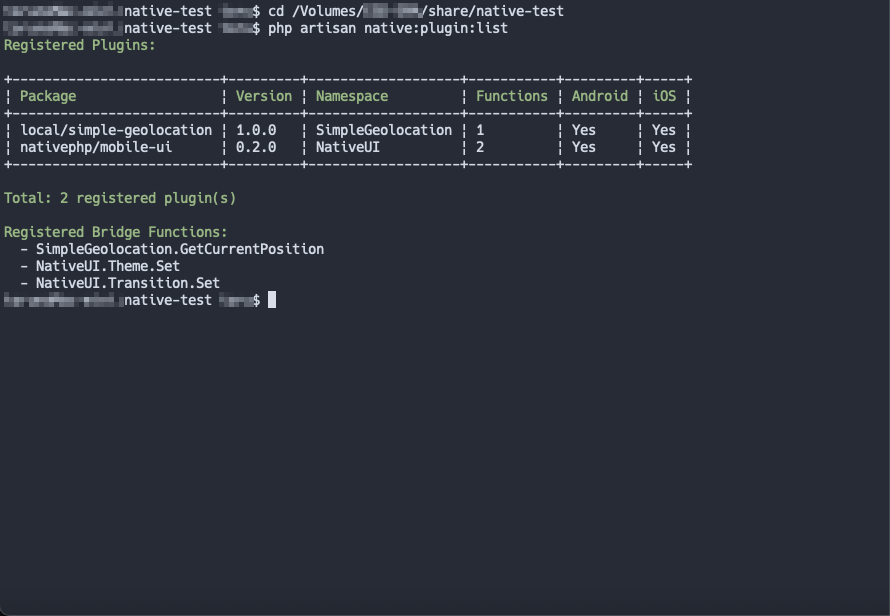
プラグイン追加後は、ネイティブコードがアプリに組み込まれるので 再ビルド( native:run )が必要です。PHP / Blade だけ触った場合も、反映は native:run で行います。
$ php artisan native:run android --no-interaction --no-tty5)Timecard からの呼び出し
NativePHP には、位置情報用の Facade ( Geolocation ) があります。 呼び方は次のような形です。
Geolocation::getCurrentPosition()
    ->locationReceived(function ($event) { ... });
今回の自作プラグインも、モバイルアプリ側からは同じ流れで使えるようにしています。クラス名が SimpleGeolocation に変わるイメージです。
前回のタイムレコーダー画面で「手動座標を使う」のチェックを OFF にすると、この経路になります。
app/NativeComponents/Timecard.php(抜粋)
                ・
                ・
                ・
            SimpleGeolocation::getCurrentPosition(true)
                ->id('timecard-punch')
                ->locationReceived(function ($event) {
                    if (! ($event->success ?? false)) {
                        $this->finishWithError(
                            $this->geolocationErrorMessage($event->error ?? null)
                        );

                        return;
                    }

                    $type = $this->pendingType;

                    if ($type === null) {
                        $this->finishWithError('打刻種別が不明です。');

                        return;
                    }

                    $this->submitPunch(
                        $type,
                        (float) $event->latitude,
                        (float) $event->longitude,
                        isset($event->accuracy) ? (float) $event->accuracy : null,
                    );
                });
                ・
                ・
                ・
ここでのポイントは次の2つです。
-
SimpleGeolocation::getCurrentPosition(true)
ここで位置取得を依頼します。true は高精度(GPS)寄りの指定です。 -
->locationReceived(function ($event) { … })
結果が返ってきたときに実行する処理を渡します。まだこの時点では座標は入っていません。
座標はすぐ return されるのではなく、あとからコールバックの $event に入ります。その $event を使って submitPunch(半径判定 → 打刻 API)へ進むところは、前回と同じです。
6)PHP からネイティブへ渡るところ
Timecard の呼び出しの裏側は、次の流れです。
-
SimpleGeolocation::getCurrentPosition(true)
ここで位置取得を依頼します。返り値はすぐ座標ではなく、依頼用のオブジェクト PendingGetCurrentPosition です。
true は高精度(GPS)寄りの指定です。 -
->locationReceived(function ($event) { … })
結果が返ってきたときに実行する処理を、このオブジェクトに登録します。
まだこの時点では座標は入っていません。 -
チェーンが終わると、PendingGetCurrentPosition のデストラクタが走る
自前プラグインの PHP 側から、NativePHP 本体の nativephp_call(‘SimpleGeolocation.GetCurrentPosition’, …) が実行され、Bridge(SimpleGeolocation.GetCurrentPosition)を呼びます。 -
ネイティブ側の処理が終わると、LocationReceived イベントで結果が戻る
手順 2 で渡した function ($event) が呼ばれ、$event に成功可否や緯度・経度などが入ります。 -
$event->latitude / $event->longitude を使って submitPunch(…) へ進む
ここから先の半径判定と打刻 API は、前回と同じです。
公式の Geolocation も、「依頼用オブジェクト → ネイティブ呼び出し → イベントで受け取る」という考え方は同じです。
7)エミュレータでの検証
ではプラグインの動作をエミュレータで検証するために、まずはエミュレータに「いまいる場所」を入れます。打刻は、この位置が .env の会社座標(COMPANY_LAT / COMPANY_LNG)から半径内かどうかで判定するので、会社座標の近くを指定します。
adb の順番は 経度 → 緯度 で、.env の緯度・経度の並びとは逆です。
adb emu geo fix XXX.XXXXXX XX.XXXXXX

adb shell am force-stop com.native_test.testapp
adb shell am start -n com.native_test.testapp/com.nativephp.mobile.ui.MainActivity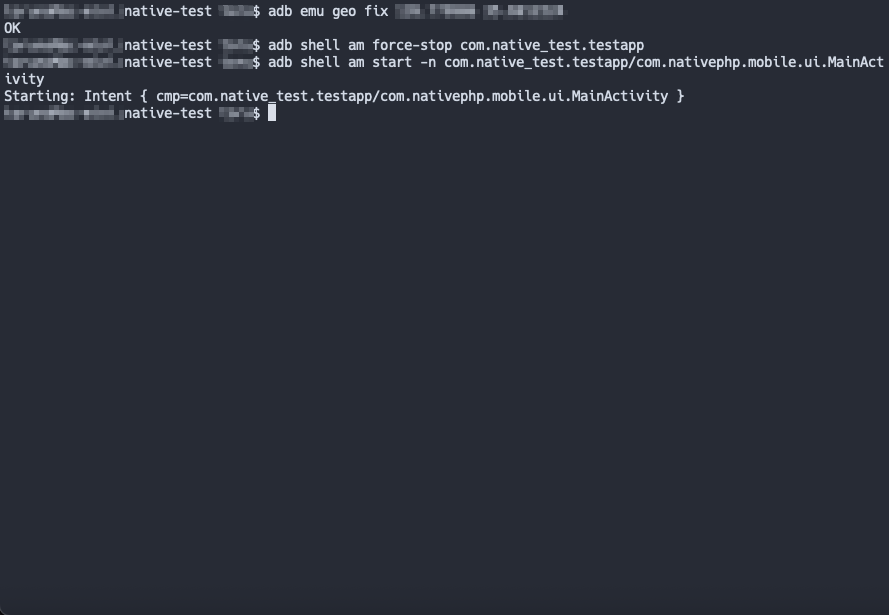
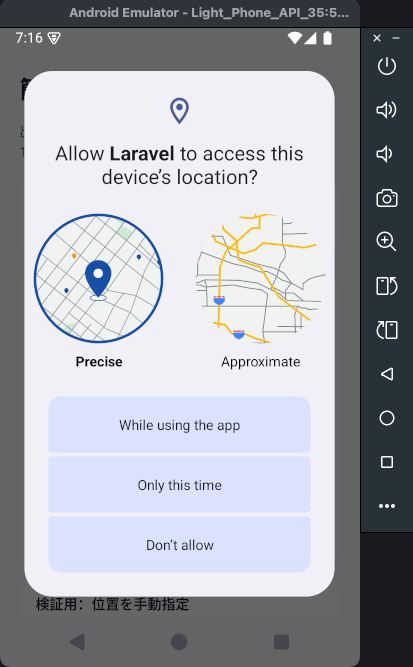
「手動座標を使う」は OFF にして、出勤をタップします。初回の場合、位置情報の権限ダイアログが表示されるので、許可します。
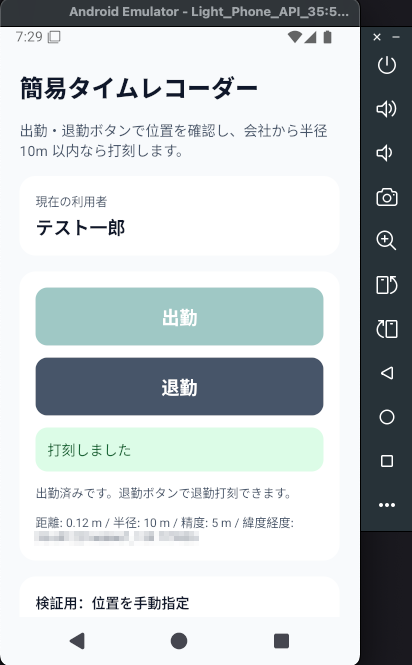
許可後に打刻が成功すると、画面にはデバッグ内容として、距離・精度が表示されます。
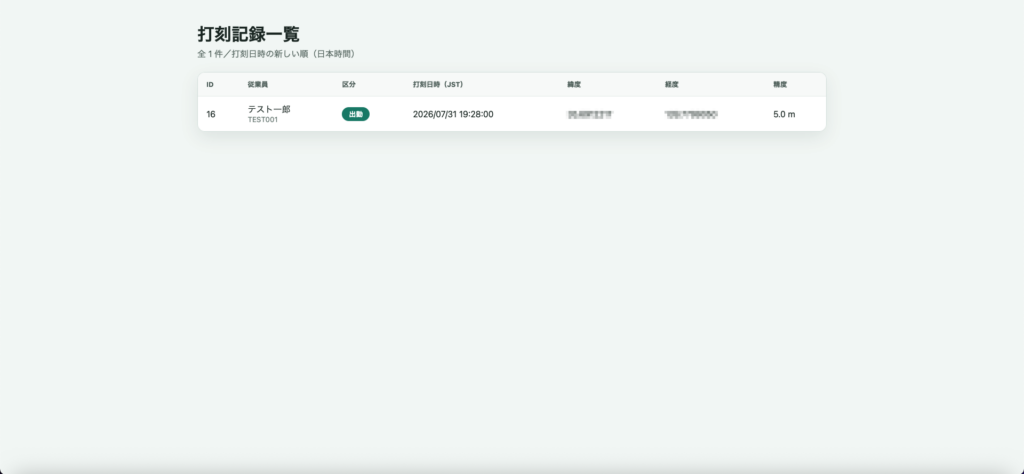
Web 打刻一覧画面でも、反映されていることを確認しました。
長くなってしまいましたが、ここまででタイムレコーダーの画面・API・半径判定に加え、端末 GPS まで一通り触れました。
試用ではありますが、スマホならではの機能や実装に触れるよい機会だったと思います。
またアイディアが湧いたときは、お試ししてみたいと思います。

