
前回の投稿 で NativePHP の環境構築からアプリ起動、Welcome 画面の表示までを確認しました。
今回は、当初お話ししていたタイムレコーダー画面の実装と、打刻を受け取る API サーバー側の実装に進みたいと思います。
1)全体の流れ
前回の投稿 に書いた通り、以下のようなタイムレコーダーアプリを作成していきます。
・出勤ボタンを押し、スマホの位置が会社の位置から半径 10m 以内であれば、出勤記録を打刻 API 経由で保存する
・退勤ボタンを押し、スマホの位置が会社の位置から半径 10m 以内であれば、退勤記録を打刻 API 経由で保存する
・会社の位置から半径 10m を外れている場合は、エラーを表示し、記録しない
これを、NativePHP for Mobile に落とし込む場合、整理していくと以下のような実装になります。
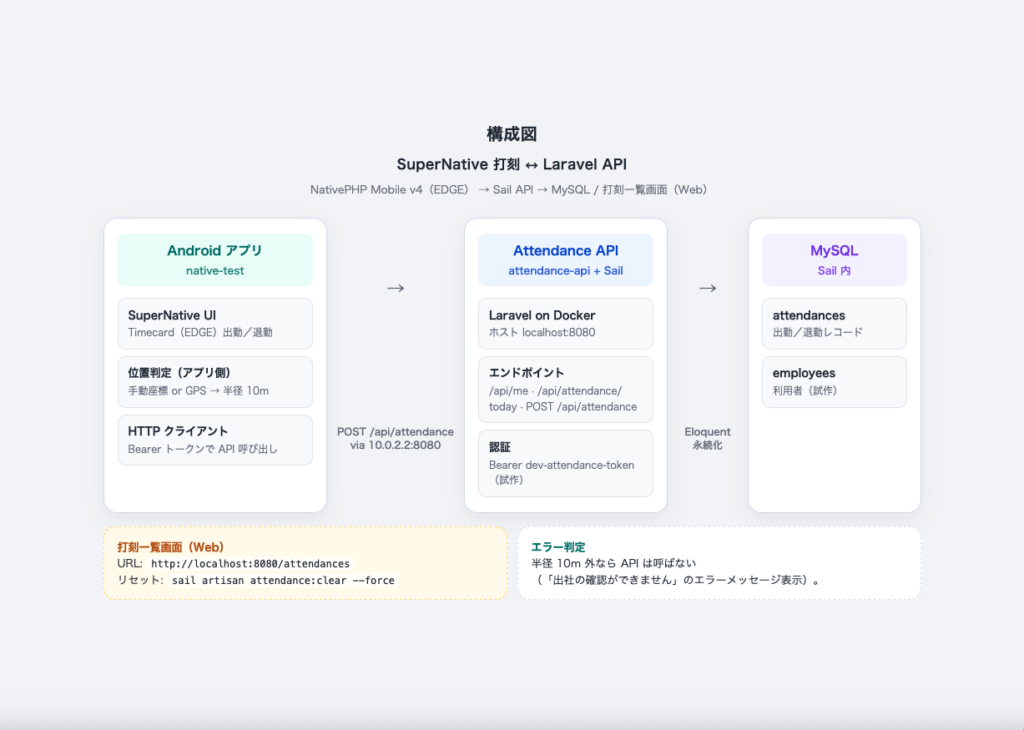
- モバイルアプリ側にタイムレコーダー画面( EDGE / NativeComponent )を作り、出勤/退勤をタップ
- 端末の位置を取得(手動 or GPS )
- 会社座標から半径内かを判定する
- OKの場合、打刻 API にPOST
- 打刻 API と同じ Laravel 上の Web 一覧で確認
位置情報の取得を行うには、Marketplace の有料プラグイン( nativephp/mobile-geolocation )もありますが、今回はまず 画面・位置の半径判定・API 連携 に絞ります。
ここで言う位置の半径判定とは、会社の緯度・経度を中心に半径(今回は 10m)の円を考え、いまの位置がその中なら打刻を許可し、外なら「出社の確認ができません」として API には送らない、というものです。このような地図上の仮想的な囲いをジオフェンスと呼びます。
成功/失敗の再現は手動座標の方が検証が安定するため、今回は手動座標での半径判定を行います。
端末 GPS を使った取得は、次回の投稿で扱います。あわせて、SuperNative からネイティブの位置取得を呼ぶ例として、自作のワンショットプラグイン( simple-geolocation )の実装も紹介します。
2)モバイルアプリにタイムレコーダー画面を実装
前回の投稿 では、Home コンポーネントで Welcome 画面を表示しました。ここでは同じ仕組みのまま、起動直後の画面をタイムレコーダーに差し替えます。
$ php artisan native:make Timecardコマンド実行で生成されるのは以下の NativeComponent です。
- app/NativeComponents/Timecard.php : 画面ロジックを持つ NativeComponent クラス
- resources/views/native/timecard.blade.php : SuperNative 用の Blade
app/NativeComponents/Timecard.php
※ 掲載しているのは最終的な実装です。API 連携や半径判定など、各処理の説明は後述します。

<?php

namespace App\NativeComponents;

use App\Services\AttendanceApiClient;
use App\Services\GeofenceService;
use Illuminate\View\View;
use Local\SimpleGeolocation\Facades\SimpleGeolocation;
use Native\Mobile\Edge\NativeComponent;
use RuntimeException;
use Throwable;

class Timecard extends NativeComponent
{
    public string $employeeName = '確認中…';

    public bool $employeeError = false;

    public string $status = '待機中です。ボタンを押してください。';

    public string $statusKind = 'muted';

    public string $dayHint = '';

    public string $debugLine = '';

    public bool $busy = false;

    public bool $clockInEnabled = true;

    public bool $clockOutEnabled = false;

    public bool $dayComplete = false;

    public bool $hasClockIn = false;

    public bool $hasClockOut = false;

    public bool $useManual = false;

    public string $manualLat = '';

    public string $manualLng = '';

    public float $companyLat = 0.0;

    public float $companyLng = 0.0;

    public float $radiusMeters = 10.0;

    public string $apiUrl = '';

    /** @var 'clock_in'|'clock_out'|null */
    public ?string $pendingType = null;

    public function mount(): void
    {
        $this->companyLat = (float) config('attendance.company_lat');
        $this->companyLng = (float) config('attendance.company_lng');
        $this->radiusMeters = (float) config('attendance.geofence_radius_meters', 10);
        $this->apiUrl = (string) config('attendance.api_url');
        $this->manualLat = (string) $this->companyLat;
        $this->manualLng = (string) $this->companyLng;
        $this->refreshDebug();
        $this->loadProfile();
        $this->loadToday();
    }

    public function clockIn(): void
    {
        $this->beginPunch('clock_in');
    }

    public function clockOut(): void
    {
        $this->beginPunch('clock_out');
    }

    public function beginPunch(string $type): void
    {
        if ($this->busy) {
            return;
        }

        if ($type === 'clock_in' && ! $this->clockInEnabled) {
            return;
        }

        if ($type === 'clock_out' && ! $this->clockOutEnabled) {
            return;
        }

        $this->busy = true;
        $this->pendingType = $type;
        $this->setStatus('位置情報を取得しています…');

        if ($this->useManual) {
            $lat = (float) $this->manualLat;
            $lng = (float) $this->manualLng;

            if ($this->manualLat === '' || $this->manualLng === '' || ! is_finite($lat) || ! is_finite($lng)) {
                $this->finishWithError('手動座標が不正です。');

                return;
            }

            $this->submitPunch($type, $lat, $lng, 0.0);

            return;
        }

        try {
            SimpleGeolocation::getCurrentPosition(true)
                ->id('timecard-punch')
                ->locationReceived(function ($event) {
                    if (! ($event->success ?? false)) {
                        $this->finishWithError(
                            $this->geolocationErrorMessage($event->error ?? null)
                        );

                        return;
                    }

                    $type = $this->pendingType;

                    if ($type === null) {
                        $this->finishWithError('打刻種別が不明です。');

                        return;
                    }

                    $this->submitPunch(
                        $type,
                        (float) $event->latitude,
                        (float) $event->longitude,
                        isset($event->accuracy) ? (float) $event->accuracy : null,
                    );
                });
        } catch (Throwable $e) {
            report($e);
            $this->finishWithError(
                '端末の位置情報APIを利用できません。手動座標を使うか、simple-geolocation プラグインの導入を確認してください。'
            );
        }
    }

    private function submitPunch(string $type, float $latitude, float $longitude, ?float $accuracy): void
    {
        $this->setStatus('打刻を送信しています…');

        /** @var GeofenceService $geofence */
        $geofence = app(GeofenceService::class);
        $check = $geofence->isWithinRadius($latitude, $longitude);

        $this->debugLine = sprintf(
            '距離: %s m / 半径: %s m / 精度: %s m / 緯度経度: %s, %s',
            $check['distance_meters'],
            $check['radius_meters'],
            $accuracy ?? '-',
            $latitude,
            $longitude,
        );

        if (! $check['allowed']) {
            $this->finishWithError('出社の確認ができません');

            return;
        }

        try {
            /** @var AttendanceApiClient $api */
            $api = app(AttendanceApiClient::class);
            $result = $api->punch($type, $latitude, $longitude, $accuracy);
            $this->applyToday($result['data']['today'] ?? null);
            $this->setStatus('打刻しました', 'ok');
        } catch (RuntimeException $e) {
            $this->setStatus($e->getMessage(), 'err');
            $this->loadToday();
        } catch (Throwable $e) {
            report($e);
            $this->setStatus('打刻処理中にエラーが発生しました。', 'err');
            $this->loadToday();
        } finally {
            $this->busy = false;
            $this->pendingType = null;
        }
    }

    private function loadProfile(): void
    {
        try {
            /** @var AttendanceApiClient $api */
            $api = app(AttendanceApiClient::class);
            $employee = $api->profile();
            $name = $employee['name'] ?? null;

            if (! is_string($name) || $name === '') {
                throw new RuntimeException('利用者情報を取得できません。');
            }

            $this->employeeName = $name;
            $this->employeeError = false;
        } catch (RuntimeException $e) {
            $this->employeeName = $e->getMessage();
            $this->employeeError = true;
        } catch (Throwable $e) {
            report($e);
            $this->employeeName = '利用者情報を取得できません。';
            $this->employeeError = true;
        }
    }

    private function loadToday(): void
    {
        try {
            /** @var AttendanceApiClient $api */
            $api = app(AttendanceApiClient::class);
            $this->applyToday($api->today());
        } catch (RuntimeException $e) {
            $this->dayHint = $e->getMessage();
            $this->clockInEnabled = false;
            $this->clockOutEnabled = false;
        } catch (Throwable $e) {
            report($e);
            $this->dayHint = '本日の打刻状態を取得できません。';
            $this->clockInEnabled = false;
            $this->clockOutEnabled = false;
        }
    }

    private function applyToday(?array $payload): void
    {
        if ($payload === null) {
            return;
        }

        $this->clockInEnabled = (bool) ($payload['clock_in_enabled'] ?? false);
        $this->clockOutEnabled = (bool) ($payload['clock_out_enabled'] ?? false);
        $this->dayComplete = (bool) ($payload['day_complete'] ?? false);
        $this->hasClockIn = (bool) ($payload['has_clock_in'] ?? false);
        $this->hasClockOut = (bool) ($payload['has_clock_out'] ?? false);

        if ($this->dayComplete) {
            $this->dayHint = '本日の出勤・退勤は完了しています。';
        } elseif ($this->hasClockIn) {
            $this->dayHint = '出勤済みです。退勤ボタンで退勤打刻できます。';
        } else {
            $this->dayHint = '本日まだ出勤していません。';
        }
    }

    private function setStatus(string $message, string $kind = 'muted'): void
    {
        $this->status = $message;
        $this->statusKind = $kind;
    }

    private function finishWithError(string $message): void
    {
        $this->setStatus($message, 'err');
        $this->busy = false;
        $this->pendingType = null;
    }

    private function refreshDebug(): void
    {
        $this->debugLine = sprintf(
            '会社座標: %s, %s / 半径 %s m / API: %s',
            $this->companyLat,
            $this->companyLng,
            $this->radiusMeters,
            $this->apiUrl,
        );
    }

    private function geolocationErrorMessage(?string $error): string
    {
        if (is_string($error) && $error !== '') {
            return $error;
        }

        return '位置情報の取得に失敗しました。手動座標を使うか、端末の位置情報設定を確認してください。';
    }

    public function render(): View
    {
        return view('native.timecard');
    }
}
resources/views/native/timecard.blade.php
※ 以下は最終的な画面実装です。

<native:scroll-view class="safe-area bg-theme-background">
    <native:column class="w-full p-5 gap-4">
        <native:text class="text-2xl font-extrabold text-theme-on-background">簡易タイムレコーダー</native:text>
        <native:text class="text-sm text-theme-on-surface-variant">
            出勤・退勤ボタンで位置を確認し、会社から半径 {{ $radiusMeters }}m 以内なら打刻します。
        </native:text>

        <native:column class="w-full bg-theme-surface rounded-2xl p-4 gap-1">
            <native:text class="text-xs text-theme-on-surface-variant">現在の利用者</native:text>
            <native:text class="text-lg font-bold {{ $employeeError ? 'text-red-600' : 'text-theme-on-surface' }}">
                {{ $employeeName }}
            </native:text>
        </native:column>

        <native:column class="w-full bg-theme-surface rounded-2xl p-4 gap-3">
            <native:pressable
                @tap="clockIn"
                class="w-full rounded-xl bg-teal-700 py-4 items-center justify-center {{ ($busy || ! $clockInEnabled) ? 'opacity-40' : '' }}"
            >
                <native:text class="text-lg font-bold text-white">
                    {{ ($busy && $pendingType === 'clock_in') ? '処理中…' : '出勤' }}
                </native:text>
            </native:pressable>

            <native:pressable
                @tap="clockOut"
                class="w-full rounded-xl bg-slate-600 py-4 items-center justify-center {{ ($busy || ! $clockOutEnabled) ? 'opacity-40' : '' }}"
            >
                <native:text class="text-lg font-bold text-white">
                    {{ ($busy && $pendingType === 'clock_out') ? '処理中…' : '退勤' }}
                </native:text>
            </native:pressable>

            <native:column class="w-full rounded-xl p-3 gap-1 {{ $statusKind === 'ok' ? 'bg-green-100' : ($statusKind === 'err' ? 'bg-red-100' : 'bg-theme-surface-variant') }}">
                <native:text class="text-sm {{ $statusKind === 'ok' ? 'text-green-800' : ($statusKind === 'err' ? 'text-red-800' : 'text-theme-on-surface-variant') }}">
                    {{ $status }}
                </native:text>
            </native:column>

            <native:text class="text-xs text-theme-on-surface-variant">{{ $dayHint }}</native:text>
            <native:text class="text-xs text-theme-on-surface-variant">{{ $debugLine }}</native:text>
        </native:column>

        <native:column class="w-full bg-theme-surface rounded-2xl p-4 gap-3">
            <native:text class="text-sm font-semibold text-theme-on-surface">検証用:位置を手動指定</native:text>
            <native:text class="text-xs text-theme-on-surface-variant">
                オフにすると端末 GPS(simple-geolocation プラグイン)を使います。
            </native:text>

            <native:checkbox native:model="useManual" label="手動座標を使う" />

            <native:outlined-text-input
                label="緯度"
                native:model="manualLat"
                keyboard-type="decimal"
            />
            <native:outlined-text-input
                label="経度"
                native:model="manualLng"
                keyboard-type="decimal"
            />
        </native:column>
    </native:column>
</native:scroll-view>
次に、ルートを Welcome 画面から Timecard に変更します。
routes/mobile.php

<?php

use App\NativeComponents\Timecard;
use Illuminate\Support\Facades\Route;

Route::native('/', Timecard::class)->name('timecard.native');
bootstrap/app.php で routes/mobile.php を読み込んでいる点は前回の投稿から変更ありません。
タイムレコーダー画面の要件は以下の通りです。
- 利用者名の表示
- 出勤/退勤ボタン
- 処理結果のステータス表示
- 検証用の「手動座標」入力(チェックボックス + 緯度・経度)
UI は HTML/JS ではなく、EDGE のネイティブ部品で組み立てています。出勤・退勤は native:pressable、手動座標は native:checkbox と native:outlined-text-input を使っています。@tap=”clockIn” / @tap=”clockOut” で、コンポーネント側のメソッドに接続しています。
先ほどのソースを反映した画面が次です。上部にはタイトル、利用者名、出勤/退勤ボタン、ステータスが表示されます。
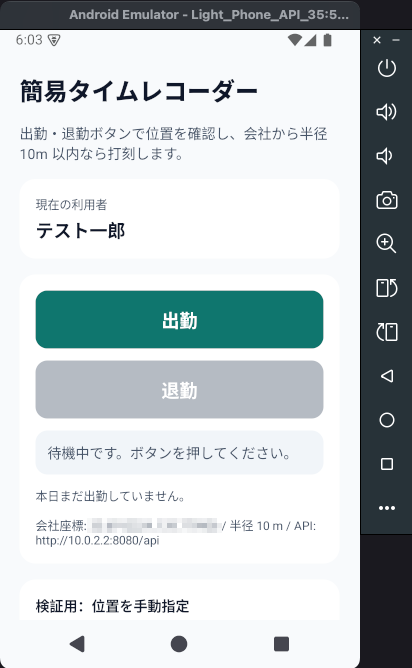
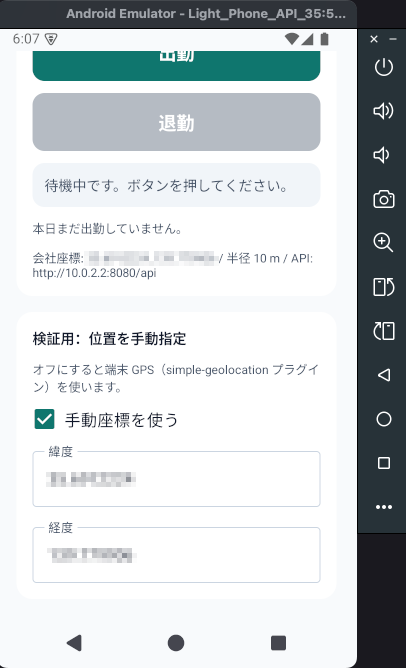
コンポーネント( Timecard )では、利用者名やステータス、手動座標の ON/OFF などをプロパティとして持ち、Blade から参照・更新します。
打刻 API への送信や半径判定など、メソッドの中身は API 側の準備のあとに説明します。
変更をエミュレータに反映するときは、前回と同様に次を実行します。
$ php artisan native:run android --no-interaction --no-tty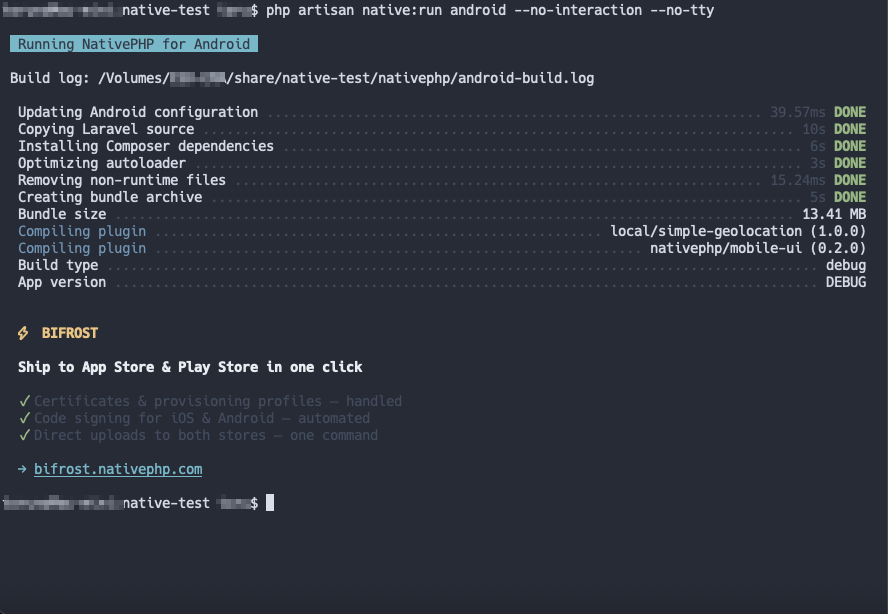
3)打刻 API を Laravel Sail で用意する
$ cd /Volumes/外付けSSD/share
$ composer create-project laravel/laravel attendance-api --prefer-dist --no-interaction
$ cd attendance-api
$ composer require laravel/sail --dev --no-interaction
$ php artisan sail:install --with=mysql --no-interactionAPP_PORT=8080
APP_URL=http://localhost:8080
ATTENDANCE_API_TOKEN=dev-attendance-token
ATTENDANCE_TEST_EMPLOYEE_CODE=TEST001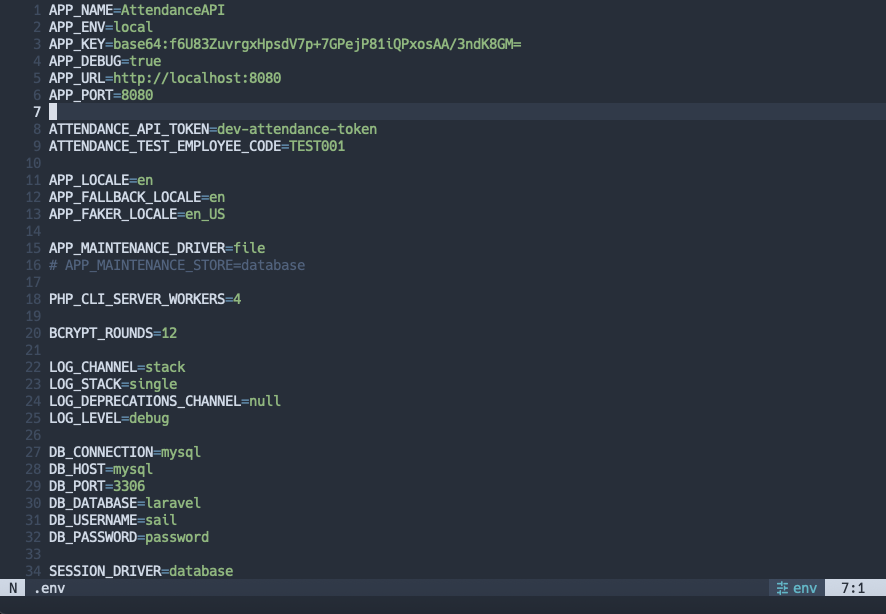
次に、打刻 API で使用する DB のテーブルについて説明します。打刻 API では、次の2つのテーブルを使います。
| テーブル | 役割 |
| employees | 利用者(社員コード・氏名など) |
| attendances | 出勤/退勤の1件ごとの記録(種別・緯度経度・打刻時刻) |
利用者は複数の打刻を持ちます( Employee hasMany Attendance )。打刻には employee_id で利用者を紐づけます。
employees には社員コード(employee_code・一意)、氏名、有効フラグを持ちます。
attendances には種別(clock_in / clock_out)、緯度・経度、精度(任意)、打刻時刻(punched_at)を持ちます。
以下に、Model と migration のソースを掲載します。
app/Models/Employee.php

<?php

namespace App\Models;

use Illuminate\Database\Eloquent\Model;
use Illuminate\Database\Eloquent\Relations\HasMany;

class Employee extends Model
{
    protected $fillable = [
        'employee_code',
        'name',
        'is_active',
    ];

    protected function casts(): array
    {
        return [
            'is_active' => 'boolean',
        ];
    }

    public function attendances(): HasMany
    {
        return $this->hasMany(Attendance::class);
    }
}
app/Models/Attendance.php
<?php
namespace App\Models;
use Illuminate\Database\Eloquent\Model;
use Illuminate\Database\Eloquent\Relations\BelongsTo;
class Attendance extends Model
{
protected $fillable = [
'employee_id',
'type',
'latitude',
'longitude',
'accuracy',
'punched_at',
];
protected function casts(): array
{
return [
'latitude' => 'float',
'longitude' => 'float',
'accuracy' => 'float',
'punched_at' => 'datetime',
];
}
public function employee(): BelongsTo
{
return $this->belongsTo(Employee::class);
}
}database/migrations/XXXX_XX_XX_000000_create_employees_table.php
<?php
use Illuminate\Database\Migrations\Migration;
use Illuminate\Database\Schema\Blueprint;
use Illuminate\Support\Facades\Schema;
return new class extends Migration
{
public function up(): void
{
Schema::create('employees', function (Blueprint $table) {
$table->id();
$table->string('employee_code')->unique();
$table->string('name');
$table->boolean('is_active')->default(true);
$table->timestamps();
});
}
public function down(): void
{
Schema::dropIfExists('employees');
}
};database/migrations/XXXX_XX_XX_000001_create_attendances_table.php
<?php
use Illuminate\Database\Migrations\Migration;
use Illuminate\Database\Schema\Blueprint;
use Illuminate\Support\Facades\Schema;
return new class extends Migration
{
public function up(): void
{
Schema::create('attendances', function (Blueprint $table) {
$table->id();
$table->string('type', 32); // clock_in | clock_out
$table->decimal('latitude', 10, 7);
$table->decimal('longitude', 10, 7);
$table->decimal('accuracy', 8, 2)->nullable();
$table->timestamp('punched_at');
$table->timestamps();
});
}
public function down(): void
{
Schema::dropIfExists('attendances');
}
};database/migrations/XXXX_XX_XX_000002_add_employee_id_to_attendances_table.php
<?php
use Illuminate\Database\Migrations\Migration;
use Illuminate\Database\Schema\Blueprint;
use Illuminate\Support\Facades\Schema;
return new class extends Migration
{
public function up(): void
{
Schema::table('attendances', function (Blueprint $table) {
$table->foreignId('employee_id')
->nullable()
->after('id')
->constrained()
->nullOnDelete();
});
}
public function down(): void
{
Schema::table('attendances', function (Blueprint $table) {
$table->dropConstrainedForeignId('employee_id');
});
}
};続けて Docker コンテナを起動し、マイグレーションとシーダーを流します。
シーダーでは、検証用の利用者「テスト一郎」(社員コード TEST001 )を登録します。
database/seeders/DatabaseSeeder.php

<?php

namespace Database\Seeders;

use App\Models\Employee;
use Illuminate\Database\Console\Seeds\WithoutModelEvents;
use Illuminate\Database\Seeder;

class DatabaseSeeder extends Seeder
{
    use WithoutModelEvents;

    /**
     * Seed the application's database.
     */
    public function run(): void
    {
        Employee::query()->updateOrCreate([
            'employee_code' => 'TEST001',
        ], [
            'name' => 'テスト一郎',
            'is_active' => true,
        ]);
    }
}
$ ./vendor/bin/sail up -d
$ ./vendor/bin/sail artisan migrate --seed今回の検証では、ログインや端末ごとの利用者登録はまだ入れていません。そのため API 側は、トークンで保護したうえで、打刻の記録は、このテスト利用者に紐づく形で残しています。アプリの「現在の利用者」に表示される名前も、ここから取得しています。
打刻結果は ブラウザから確認できるようにしています。今回の検証ではログインなしの簡易ページで、GET /attendances が打刻記録一覧です。
Controller では、打刻を新しい順に取得し、利用者( employee )を一緒に読み込みます。表示は 20 件ずつページネーションします。
app/Http/Controllers/AttendanceWebController.php

<?php

namespace App\Http\Controllers;

use App\Models\Attendance;
use Illuminate\View\View;

class AttendanceWebController extends Controller
{
    public function index(): View
    {
        $attendances = Attendance::query()
            ->select([
                'id',
                'employee_id',
                'type',
                'latitude',
                'longitude',
                'accuracy',
                'punched_at',
            ])
            ->with('employee:id,employee_code,name')
            ->orderByDesc('punched_at')
            ->orderByDesc('id')
            ->paginate(20);

        return view('attendances.index', compact('attendances'));
    }
}
ルーティングは routes/web.php です。
routes/web.php

<?php

use App\Http\Controllers\AttendanceWebController;
use Illuminate\Support\Facades\Route;

Route::get('/', function () {
    return redirect()->route('attendances.index');
});

Route::get('/attendances', [AttendanceWebController::class, 'index'])
    ->name('attendances.index');
ビューは resources/views/attendances/index.blade.php です。
resources/views/attendances/index.blade.php

<!DOCTYPE html>
<html lang="ja">
<head>
    <meta charset="utf-8">
    <meta name="viewport" content="width=device-width, initial-scale=1">
    <title>打刻記録一覧 | {{ config('app.name') }}</title>
    <style>
        :root {
            color-scheme: light;
            font-family: -apple-system, BlinkMacSystemFont, "Segoe UI", sans-serif;
            color: #1d2b26;
            background: #f3f7f5;
        }

        * {
            box-sizing: border-box;
        }

        body {
            margin: 0;
        }

        main {
            width: min(1180px, calc(100% - 32px));
            margin: 48px auto;
        }

        h1 {
            margin: 0;
            font-size: clamp(1.5rem, 4vw, 2rem);
        }

        .summary {
            margin: 8px 0 24px;
            color: #60706a;
        }

        .table-wrap {
            overflow-x: auto;
            border: 1px solid #d9e3df;
            border-radius: 14px;
            background: #fff;
            box-shadow: 0 10px 30px rgb(31 58 48 / 8%);
        }

        table {
            width: 100%;
            min-width: 900px;
            border-collapse: collapse;
        }

        th,
        td {
            padding: 14px 16px;
            border-bottom: 1px solid #e8eeeb;
            text-align: left;
            white-space: nowrap;
        }

        th {
            color: #52635d;
            background: #f8faf9;
            font-size: 0.8rem;
            font-weight: 700;
        }

        tbody tr:last-child td {
            border-bottom: 0;
        }

        tbody tr:hover {
            background: #f8fbfa;
        }

        .employee-code,
        .subtle {
            color: #71807b;
            font-size: 0.85rem;
        }

        .badge {
            display: inline-block;
            min-width: 52px;
            padding: 5px 10px;
            border-radius: 999px;
            color: #fff;
            text-align: center;
            font-size: 0.8rem;
            font-weight: 700;
        }

        .clock-in {
            background: #27836f;
        }

        .clock-out {
            background: #4d6f9d;
        }

        .empty {
            padding: 56px 24px;
            color: #71807b;
            text-align: center;
        }

        nav {
            display: flex;
            align-items: center;
            justify-content: space-between;
            gap: 16px;
            margin-top: 20px;
        }

        .page-link {
            display: inline-block;
            padding: 10px 16px;
            border: 1px solid #cbd8d3;
            border-radius: 9px;
            color: #236d5d;
            background: #fff;
            text-decoration: none;
        }

        .page-link:hover {
            background: #eaf4f0;
        }

        .page-link.disabled {
            color: #9aa6a2;
            background: #eef2f0;
            pointer-events: none;
        }

        @media (max-width: 600px) {
            main {
                width: min(100% - 20px, 1180px);
                margin: 24px auto;
            }
        }
    </style>
</head>
<body>
<main>
    <h1>打刻記録一覧</h1>
    <p class="summary">全 {{ number_format($attendances->total()) }} 件/打刻日時の新しい順(日本時間)</p>

    <div class="table-wrap">
        @if ($attendances->isEmpty())
            <div class="empty">打刻記録はまだありません。</div>
        @else
            <table>
                <thead>
                <tr>
                    <th>ID</th>
                    <th>従業員</th>
                    <th>区分</th>
                    <th>打刻日時(JST)</th>
                    <th>緯度</th>
                    <th>経度</th>
                    <th>精度</th>
                </tr>
                </thead>
                <tbody>
                @foreach ($attendances as $attendance)
                    <tr>
                        <td>{{ $attendance->id }}</td>
                        <td>
                            <div>{{ $attendance->employee?->name ?? '削除済みの従業員' }}</div>
                            @if ($attendance->employee)
                                <div class="employee-code">{{ $attendance->employee->employee_code }}</div>
                            @endif
                        </td>
                        <td>
                            <span class="badge {{ $attendance->type === 'clock_in' ? 'clock-in' : 'clock-out' }}">
                                {{ $attendance->type === 'clock_in' ? '出勤' : '退勤' }}
                            </span>
                        </td>
                        <td>{{ $attendance->punched_at?->timezone('Asia/Tokyo')->format('Y/m/d H:i:s') ?? '-' }}</td>
                        <td>{{ number_format($attendance->latitude, 7) }}</td>
                        <td>{{ number_format($attendance->longitude, 7) }}</td>
                        <td>
                            {{ $attendance->accuracy !== null ? number_format($attendance->accuracy, 1).' m' : '-' }}
                        </td>
                    </tr>
                @endforeach
                </tbody>
            </table>
        @endif
    </div>

    @if ($attendances->hasPages())
        <nav aria-label="ページ移動">
            <a
                class="page-link {{ $attendances->onFirstPage() ? 'disabled' : '' }}"
                href="{{ $attendances->previousPageUrl() ?? '#' }}"
            >前のページ</a>
            <span class="subtle">{{ $attendances->currentPage() }} / {{ $attendances->lastPage() }} ページ</span>
            <a
                class="page-link {{ $attendances->hasMorePages() ? '' : 'disabled' }}"
                href="{{ $attendances->nextPageUrl() ?? '#' }}"
            >次のページ</a>
        </nav>
    @endif
</main>
</body>
</html>
Sail 起動の様子です。
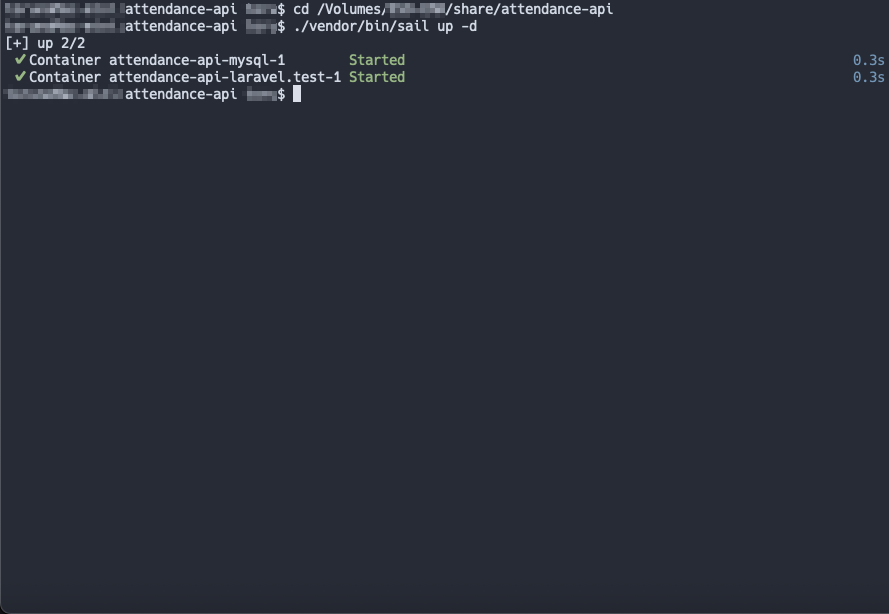
起動直後はまだ打刻がないので、一覧は空の状態です。ブラウザで次を開けば、API 側が動いていることを確認できます。
http://localhost:8080/attendances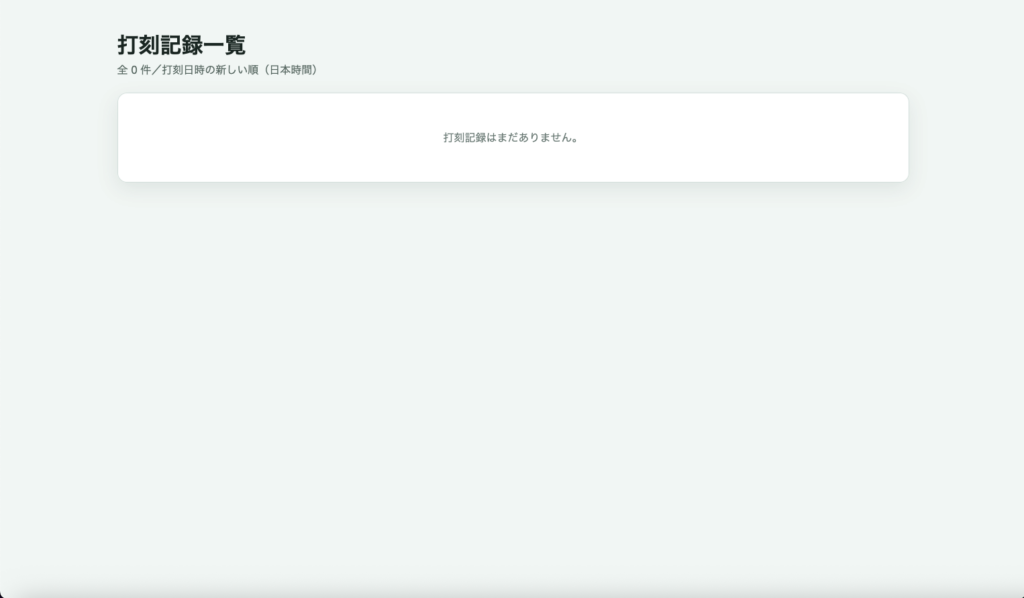
| メソッド | パス | 用途 |
| GET | /api/me | 利用者情報(画面の名前表示用) |
| GET | /api/attendance/today | 本日の打刻状態・ボタン可否 |
| POST | /api/attendance | 出勤/退勤の記録 |
routes/api.php

<?php

use App\Http\Controllers\Api\AttendanceController;
use App\Http\Controllers\Api\EmployeeController;
use App\Http\Middleware\VerifyAttendanceApiToken;
use Illuminate\Support\Facades\Route;

Route::middleware(VerifyAttendanceApiToken::class)->group(function () {
    Route::get('/me', [EmployeeController::class, 'show']);
    Route::get('/attendance/today', [AttendanceController::class, 'today']);
    Route::post('/attendance', [AttendanceController::class, 'store']);
});app/Http/Middleware/VerifyAttendanceApiToken.php
<?php
namespace App\Http\Middleware;
use Closure;
use Illuminate\Http\Request;
use Symfony\Component\HttpFoundation\Response;
class VerifyAttendanceApiToken
{
public function handle(Request $request, Closure $next): Response
{
$expected = (string) config('services.attendance.token', '');
if ($expected === '') {
return response()->json([
'message' => 'ATTENDANCE_API_TOKEN is not configured on the server.',
], 500);
}
$provided = (string) $request->bearerToken();
if (! hash_equals($expected, $provided)) {
return response()->json([
'message' => 'Unauthorized.',
], 401);
}
return $next($request);
}
}config/services.php
<?php
return [
/*
|--------------------------------------------------------------------------
| Third Party Services
|--------------------------------------------------------------------------
|
| This file is for storing the credentials for third party services such
| as Mailgun, Postmark, AWS and more. This file provides the de facto
| location for this type of information, allowing packages to have
| a conventional file to locate the various service credentials.
|
*/
'postmark' => [
'key' => env('POSTMARK_API_KEY'),
],
'resend' => [
'key' => env('RESEND_API_KEY'),
],
'ses' => [
'key' => env('AWS_ACCESS_KEY_ID'),
'secret' => env('AWS_SECRET_ACCESS_KEY'),
'region' => env('AWS_DEFAULT_REGION', 'us-east-1'),
],
'slack' => [
'notifications' => [
'bot_user_oauth_token' => env('SLACK_BOT_USER_OAUTH_TOKEN'),
'channel' => env('SLACK_BOT_USER_DEFAULT_CHANNEL'),
],
],
'attendance' => [
'token' => env('ATTENDANCE_API_TOKEN'),
'employee_code' => env('ATTENDANCE_TEST_EMPLOYEE_CODE', 'TEST001'),
],
];app/Http/Controllers/Api/EmployeeController.php
<?php
namespace App\Http\Controllers\Api;
use App\Http\Controllers\Controller;
use App\Models\Employee;
use Illuminate\Http\JsonResponse;
class EmployeeController extends Controller
{
public function show(): JsonResponse
{
$employee = Employee::query()
->where('employee_code', config('services.attendance.employee_code'))
->where('is_active', true)
->firstOrFail();
return response()->json([
'data' => [
'id' => $employee->id,
'employee_code' => $employee->employee_code,
'name' => $employee->name,
],
]);
}
}本日の打刻状態(GET /api/attendance/today )は、本日の出勤/退勤済みか、ボタンを押せるかを返します。モバイルアプリ側の出勤・退勤ボタンの有効/無効に使います。
打刻の記録(POST /api/attendance)は、type(clock_in / clock_out)と緯度・経度などを受け取り、打刻を1件作成します。どちらも固定のテスト利用者に紐づけます。二重打刻などは TodayAttendanceStatus で止め、409 を返します。
app/Http/Controllers/Api/AttendanceController.php
※1 本日の打刻状態については today メソッドが該当
※2 打刻の記録については store メソッドが該当

<?php

namespace App\Http\Controllers\Api;

use App\Http\Controllers\Controller;
use App\Models\Attendance;
use App\Models\Employee;
use App\Services\TodayAttendanceStatus;
use Illuminate\Http\JsonResponse;
use Illuminate\Http\Request;

class AttendanceController extends Controller
{
    public function today(TodayAttendanceStatus $status): JsonResponse
    {
        $employee = $this->testEmployee();

        return response()->json([
            'data' => $status->forEmployee($employee),
        ]);
    }

    public function store(Request $request, TodayAttendanceStatus $status): JsonResponse
    {
        $validated = $request->validate([
            'type' => ['required', 'in:clock_in,clock_out'],
            'latitude' => ['required', 'numeric', 'between:-90,90'],
            'longitude' => ['required', 'numeric', 'between:-180,180'],
            'accuracy' => ['nullable', 'numeric', 'min:0'],
            'punched_at' => ['nullable', 'date'],
        ]);

        $employee = $this->testEmployee();
        $status->assertCanPunch($employee, $validated['type']);

        $attendance = Attendance::query()->create([
            'employee_id' => $employee->id,
            'type' => $validated['type'],
            'latitude' => $validated['latitude'],
            'longitude' => $validated['longitude'],
            'accuracy' => $validated['accuracy'] ?? null,
            'punched_at' => $validated['punched_at'] ?? now(),
        ]);

        $label = $validated['type'] === 'clock_in' ? '出勤' : '退勤';
        $today = $status->forEmployee($employee);

        return response()->json([
            'message' => "{$label}を打刻しました",
            'data' => [
                'id' => $attendance->id,
                'employee' => [
                    'id' => $employee->id,
                    'employee_code' => $employee->employee_code,
                    'name' => $employee->name,
                ],
                'type' => $attendance->type,
                'latitude' => $attendance->latitude,
                'longitude' => $attendance->longitude,
                'accuracy' => $attendance->accuracy,
                'punched_at' => $attendance->punched_at?->toIso8601String(),
                'today' => $today,
            ],
        ], 201);
    }

    private function testEmployee(): Employee
    {
        return Employee::query()
            ->where('employee_code', config('services.attendance.employee_code'))
            ->where('is_active', true)
            ->firstOrFail();
    }
}
本日の出勤・退勤ボタンを押せるかの判定については、次のサービスに切り出しています。
app/Services/TodayAttendanceStatus.php

<?php

namespace App\Services;

use App\Models\Attendance;
use App\Models\Employee;
use Carbon\Carbon;
use Illuminate\Http\Exceptions\HttpResponseException;
use Illuminate\Support\Collection;

class TodayAttendanceStatus
{
    /**
     * @return array{
     *     date: string,
     *     has_clock_in: bool,
     *     has_clock_out: bool,
     *     day_complete: bool,
     *     clock_in_enabled: bool,
     *     clock_out_enabled: bool
     * }
     */
    public function forEmployee(Employee $employee): array
    {
        $punches = $this->todayPunches($employee);

        $hasClockIn = $punches->contains(fn (Attendance $a) => $a->type === 'clock_in');
        $hasClockOut = $punches->contains(fn (Attendance $a) => $a->type === 'clock_out');
        $dayComplete = $hasClockIn && $hasClockOut;

        return [
            'date' => $this->today()->toDateString(),
            'has_clock_in' => $hasClockIn,
            'has_clock_out' => $hasClockOut,
            'day_complete' => $dayComplete,
            // 出勤後は出勤マスク。出勤・退勤が揃ったら両方マスク。
            'clock_in_enabled' => ! $hasClockIn && ! $dayComplete,
            'clock_out_enabled' => $hasClockIn && ! $hasClockOut,
        ];
    }

    public function assertCanPunch(Employee $employee, string $type): void
    {
        $status = $this->forEmployee($employee);

        if ($type === 'clock_in' && ! $status['clock_in_enabled']) {
            throw new HttpResponseException(response()->json([
                'message' => $status['day_complete']
                    ? '本日の出退勤は完了しています。'
                    : '本日はすでに出勤打刻済みです。',
                'data' => $status,
            ], 409));
        }

        if ($type === 'clock_out' && ! $status['clock_out_enabled']) {
            throw new HttpResponseException(response()->json([
                'message' => $status['day_complete']
                    ? '本日の出退勤は完了しています。'
                    : '先に出勤打刻を行ってください。',
                'data' => $status,
            ], 409));
        }
    }

    /**
     * @return Collection<int, Attendance>
     */
    public function todayPunches(Employee $employee): Collection
    {
        $start = $this->today()->copy()->startOfDay()->utc();
        $end = $this->today()->copy()->endOfDay()->utc();

        return Attendance::query()
            ->where('employee_id', $employee->id)
            ->whereBetween('punched_at', [$start, $end])
            ->orderBy('punched_at')
            ->get();
    }

    public function today(): Carbon
    {
        return now('Asia/Tokyo');
    }
}
「日本時間の今日」を基準に、出勤後は出勤ボタンを止め、退勤後は両方止める、といった制御を行なっています。
4)モバイルアプリ側の接続設定
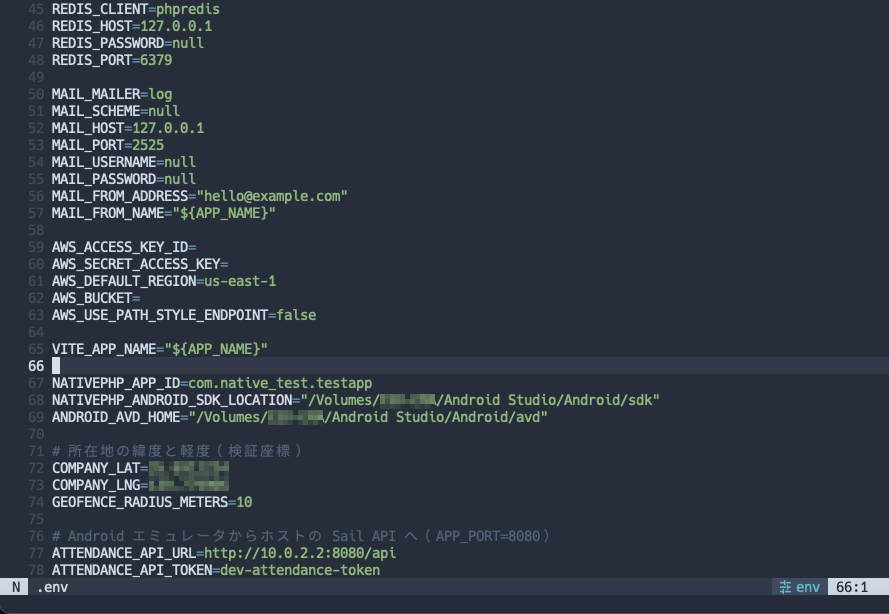
COMPANY_LAT=XX.XXXXXX
COMPANY_LNG=XXX.XXXXXX
GEOFENCE_RADIUS_METERS=10

ATTENDANCE_API_URL=http://10.0.2.2:8080/api
ATTENDANCE_API_TOKEN=dev-attendance-token
それぞれの内容については以下の通りです。
| キー | 意味 |
| COMPANY_LAT / COMPANY_LNG | 会社(打刻許可エリア)の中心座標 |
| GEOFENCE_RADIUS_METERS | 半径(メートル)。今回は 10m |
| ATTENDANCE_API_URL | 打刻 API のベース URL |
| ATTENDANCE_API_TOKEN | Bearer トークン(API 側と同じ値) |
10.0.2.2 は、Android エミュレータからホストマシンの localhost を指す特別なアドレスです。ホストでは http://localhost:8080、エミュレータからは http://10.0.2.2:8080 になります。末尾の /api は、3)で用意した JSON API のプレフィックスです。
トークンは、API 側 .env の ATTENDANCE_API_TOKEN と揃えてください。ずれていると 401 になります。
config/attendance.php

<?php

return [
    'company_lat' => env('COMPANY_LAT', ZZ.ZZZZZZ),
    'company_lng' => env('COMPANY_LNG', ZZZ.ZZZZZZ),
    'geofence_radius_meters' => env('GEOFENCE_RADIUS_METERS', 10),
    'api_url' => env('ATTENDANCE_API_URL', 'http://10.0.2.2:8080/api'),
    'api_token' => env('ATTENDANCE_API_TOKEN', 'dev-attendance-token'),
];$ php artisan config:clear5)半径判定と API 呼び出し( GeofenceService / AttendanceApiClient / Timecard の打刻処理)
- いまの位置を決める(今回は画面上の手動座標。GPS は次回)
- 会社の位置からどれくらい離れているかを計算する(GeofenceService)
- 半径の内側なら、打刻 API へ記録を送る(AttendanceApiClient)
- 画面のメッセージと、出勤/退勤ボタンの状態を更新する
app/Services/GeofenceService.php

<?php

namespace App\Services;

class GeofenceService
{
    /**
     * Haversine formula: distance in meters between two WGS84 points.
     */
    public function distanceMeters(float $lat1, float $lng1, float $lat2, float $lng2): float
    {
        $earthRadius = 6371000;

        $latFrom = deg2rad($lat1);
        $lonFrom = deg2rad($lng1);
        $latTo = deg2rad($lat2);
        $lonTo = deg2rad($lng2);

        $latDelta = $latTo - $latFrom;
        $lonDelta = $lonTo - $lonFrom;

        $a = sin($latDelta / 2) ** 2
            + cos($latFrom) * cos($latTo) * sin($lonDelta / 2) ** 2;

        return 2 * $earthRadius * asin(min(1, sqrt($a)));
    }

    public function isWithinRadius(float $latitude, float $longitude): array
    {
        $companyLat = (float) config('attendance.company_lat');
        $companyLng = (float) config('attendance.company_lng');
        $radius = (float) config('attendance.geofence_radius_meters', 10);

        $distance = $this->distanceMeters($latitude, $longitude, $companyLat, $companyLng);

        return [
            'allowed' => $distance <= $radius,
            'distance_meters' => round($distance, 2),
            'radius_meters' => $radius,
            'company_lat' => $companyLat,
            'company_lng' => $companyLng,
        ];
    }
}| キー | 意味 |
| allowed | 半径内なら打刻してよい |
| distance_meters | 会社からの距離(メートル) |
| radius_meters | 許可する半径(今回は 10m) |
半径 10m より外側だった場合は打刻 API には送らず、画面に「出社の確認ができません」と表示します。
AttendanceApiClient は、3)で用意した JSON API を、アプリから呼び出すためのサービスクラスです。接続先の URL とトークンは、4)の config/attendance.php から読みます。
app/Services/AttendanceApiClient.php

<?php

namespace App\Services;

use Illuminate\Http\Client\RequestException;
use Illuminate\Support\Facades\Http;
use RuntimeException;

class AttendanceApiClient
{
    public function profile(): array
    {
        $response = $this->request()->get($this->url('/me'))->throw();

        return $response->json('data') ?? [];
    }

    public function today(): array
    {
        try {
            $response = $this->request()->get($this->url('/attendance/today'))->throw();
        } catch (RequestException $e) {
            throw new RuntimeException('本日の打刻状態を取得できません。', previous: $e);
        }

        return $response->json('data') ?? [];
    }

    public function punch(string $type, float $latitude, float $longitude, ?float $accuracy = null): array
    {
        try {
            $response = $this->request()
                ->post($this->url('/attendance'), [
                    'type' => $type,
                    'latitude' => $latitude,
                    'longitude' => $longitude,
                    'accuracy' => $accuracy,
                ])
                ->throw();
        } catch (RequestException $e) {
            $message = $e->response?->json('message');

            throw new RuntimeException(
                is_string($message) && $message !== ''
                    ? $message
                    : '打刻APIへの送信に失敗しました。',
                previous: $e,
            );
        }

        return $response->json() ?? [];
    }

    private function request()
    {
        $token = (string) config('attendance.api_token');

        if ($token === '') {
            throw new RuntimeException('ATTENDANCE_API_TOKEN が未設定です。');
        }

        return Http::timeout(10)
            ->acceptJson()
            ->withToken($token);
    }

    private function url(string $path): string
    {
        $baseUrl = rtrim((string) config('attendance.api_url'), '/');

        if ($baseUrl === '') {
            throw new RuntimeException('ATTENDANCE_API_URL が未設定です。');
        }

        return $baseUrl.$path;
    }
}
このクラスが行うことは、次の3つです。
| メソッド | 対応する API | 何をするか |
| profile() | GET /api/me | 利用者の名前を取得 |
| today() | GET /api/attendance/today | 本日、出勤/退勤できるかの状態を取得 |
| punch() | POST /api/attendance | 出勤/退勤を記録する |
Timecard 打刻処理の画面クラス自体は、2)で掲載済みなので、ここでは打刻に関係する動きだけ追います。
mount(アプリ起動時)は、会社の座標・半径・API の URL を読み込みます。あわせて、利用者名( loadProfile )と、本日の打刻状態( loadToday )も取得します。
clockIn / clockOut → beginPunch(出勤/退勤ボタン)は、すでに処理中のときや、ボタンが押せない状態のときは何もしません。「手動座標を使う」が ON なら、入力した緯度・経度で submitPunch(打刻実行)に進みます。OFF のときは端末の GPS( simple-geolocation )を使いますが、今回の確認は手動座標を前提にしています。GPS の話は次回に回します。
submitPunch(打刻実行)は、
- GeofenceService で、会社から半径内かを見る
- 外側なら「出社の確認ができません」と出して終了する(API は呼ばない)
- 内側なら AttendanceApiClient で打刻を送る
- 返ってきた本日の状態でボタンを更新し、「打刻しました」と表示する
画面のデバッグ行には、距離や半径も出しています。検証のとき、「何メートル離れていたか」をその場で確認できます。
6)動作検証
ここまでの実装を、実際の画面で確認していきます。今回は GPS ではなく、画面下の「手動座標を使う」を ON にして進めます。
前提は次のとおりです。
- 打刻 API( Sail )が起動している
- モバイルアプリ側 .env の設定が読み込まれている
- 「手動座標を使う」にチェックが入っている
① 半径内で 出勤 → 退勤 → 打刻一覧の確認
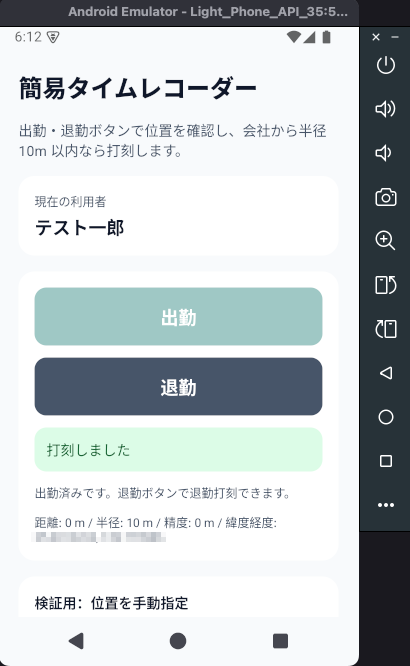
まず、手動の緯度・経度を、会社座標と同じ値にします。これで距離はほぼ 0m になり、半径 10m の内側として扱われます。出勤をタップすると、「打刻しました」と表示され、本日の状態も「出勤済み」に変わります。
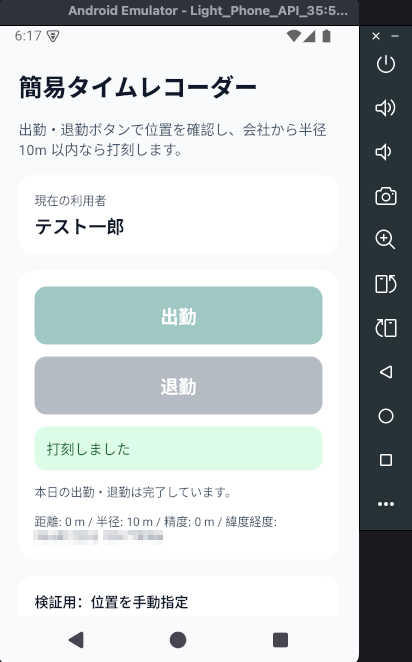
続けて退勤をタップすると、退勤も記録され、本日の出退勤が完了した状態になります。
ブラウザの打刻一覧を開くと、いま打った出勤・退勤が並びます。
打刻一覧 : http://localhost:8080/attendances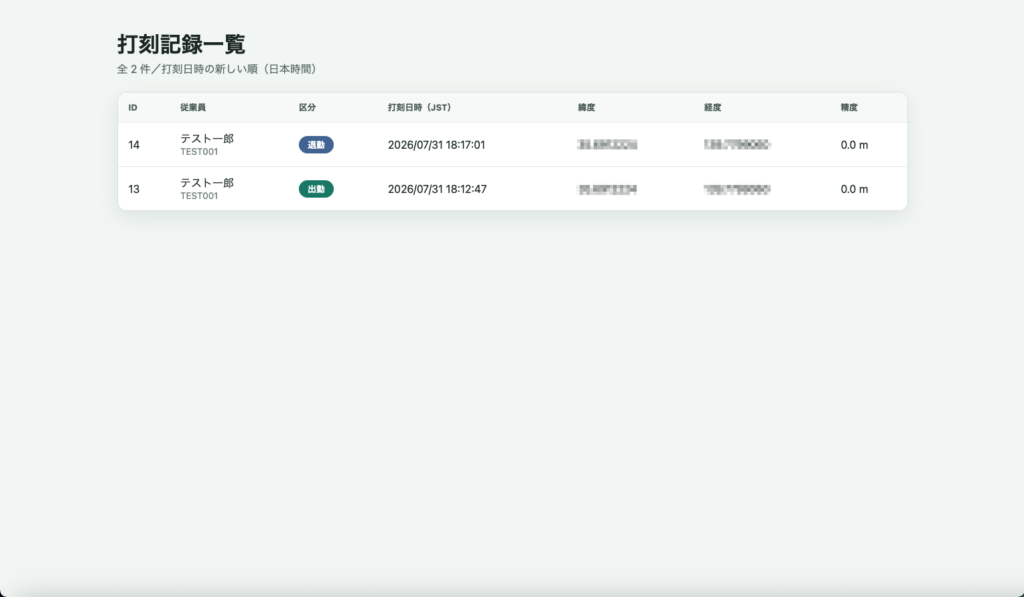
② 半径外ではエラーになること
次に、手動座標を会社から十分離した値に変えます。出勤をタップすると、打刻 API には送らず、「出社の確認ができません」と表示されます。
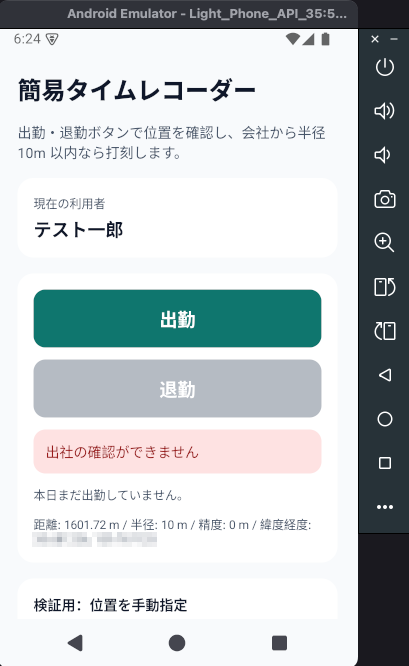
モバイルアプリ側の動作が、一通り確認できるところまで来ました。今回は画面・打刻 API・半径判定まで扱ったので、随分と長くなってしまいました。
次回は特別編として、端末の GPS(自作の simple-geolocation プラグイン)で位置を取る話を書く予定です。

